
FOMEI LED DMX 300B Studio Light - PhotoRobot Οδηγός χρήσης
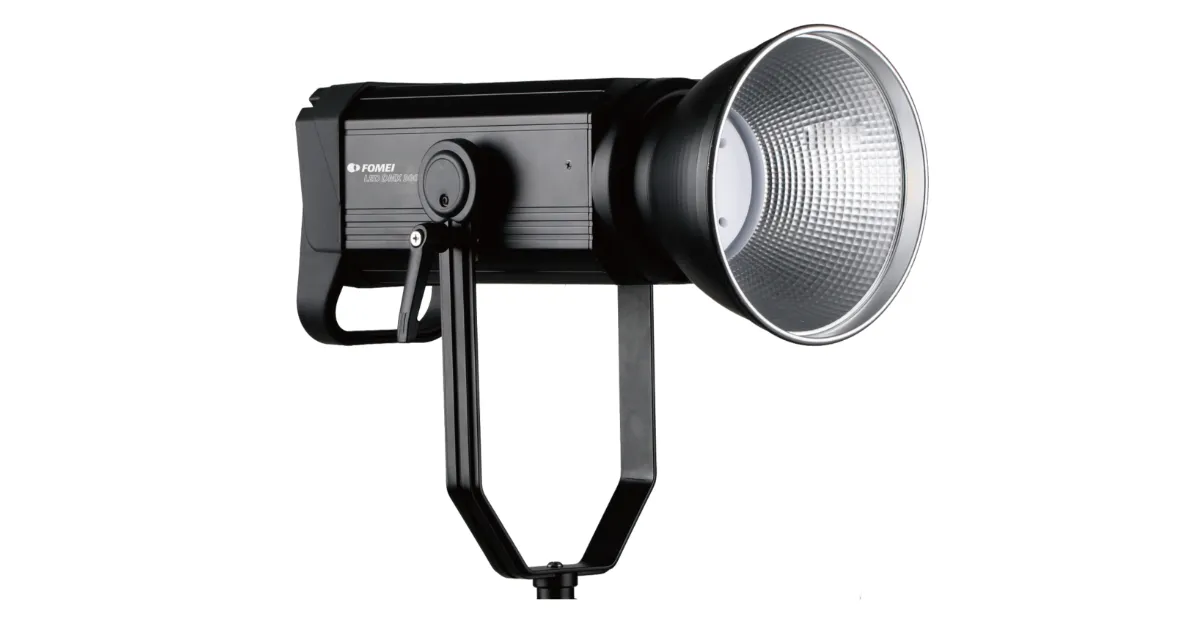
Αυτό το εγχειρίδιο χρήσης για PhotoRobot Οι πελάτες παρέχουν οδηγίες για τη λειτουργία του φωτιστικού στούντιο FOMEI LED DMX 300B. Οι πληροφορίες στοχεύουν στην υποστήριξη PhotoRobot πελάτες στη χρήση του FOMEI LED DMX 300B με το δικό τους PhotoRobot σύστημα.
Σημείωση: Αυτό το εγχειρίδιο χρήσης αποτελεί αναπαραγωγή της επίσημης τεκμηρίωσης από τον κατασκευαστή για το FOMEI LED DMX 300B. Ανατρέξτε στον ιστότοπο του κατασκευαστή fomei.com για την επίσημη τεκμηρίωση για το συγκεκριμένο προϊόν σας. Επίσης, φροντίστε να διαβάσετε οποιαδήποτε τεκμηρίωση παρέχεται ειδικά για τη συσκευή σας πριν από την πρώτη χρήση της.
Σημαντικό: Πριν από τη λειτουργία, βεβαιωθείτε ότι το προϊόν είναι άθικτο και ότι δεν λείπουν εξαρτήματα. Μην ανοίγετε ή επισκευάζετε τη μονάδα μόνοι σας. Εάν υπάρχει κάποιο ελάττωμα, επικοινωνήστε απευθείας με τη FOMEI. Για πληροφορίες εγγύησης και συντήρησης των προϊόντων FOMEI, ανατρέξτε στην τεκμηρίωση που παρέχεται ειδικά για τη συσκευή σας.
Προειδοποιήσεις Πριν τη Χρήση
Λάβετε υπόψη τις ακόλουθες προειδοποιήσεις πριν από τη χρήση:
- Βεβαιωθείτε ότι το προϊόν είναι άθικτο και ότι δεν λείπουν εξαρτήματα.
- Σε περίπτωση ζημιάς, επικοινωνήστε με έναν επαγγελματία αντιπρόσωπο σέρβις της FOMEI.
- Όταν χρησιμοποιείτε το προϊόν, βεβαιωθείτε ότι το περιβάλλον είναι στεγνό και αεριζόμενο.
- Για βέλτιστη απόδοση, καθαρίζετε τακτικά το προϊόν χρησιμοποιώντας ένα καθαρό πανί.
- Μην γρατσουνίζετε και μην ασκείτε πίεση στο προϊόν.
Προειδοποιήσεις ασφαλείας
Βεβαιωθείτε ότι ακολουθείτε τις προειδοποιήσεις ασφαλείας:
- Μη χρησιμοποιείτε τη μονάδα LED σε περιβάλλον όπου η υγρασία είναι πιθανό να έρθει σε επαφή με τη μονάδα.
- Μην αποσυναρμολογείτε το προϊόν. Σε περίπτωση ζημιάς, επικοινωνήστε με έναν εκπρόσωπο σέρβις της FOMEI ή με σύμβαση εκπαιδευμένων επαγγελματιών.
- Εάν το προϊόν αποσυναρμολογηθεί, δεν θα καλύπτεται από την εγγύηση.
- Μη χρησιμοποιείτε το προϊόν σε ακραίες θερμοκρασίες (+50° C)
- Το προϊόν δεν είναι κατάλληλο για παιδιά.
- Μην συνδέετε / αποσυνδέετε τη συσκευή όταν η τροφοδοσία είναι ακόμα συνδεδεμένη.
- Μην επιβαρύνετε το φως περισσότερο από όσο χρειάζεται.
- Μην περιορίζετε τους αεραγωγούς κατά τη χρήση.
- Λάβετε υπόψη ότι υπάρχει κίνδυνος πυρκαγιάς εάν εύφλεκτα υλικά τοποθετηθούν σε κοντινή απόσταση όταν η μονάδα χρησιμοποιείται.
- Αποφύγετε την τοποθέτηση καλωδίων όπου μπορεί να είναι επικίνδυνα.
- Να φυλάσσεται μακριά από παιδιά.
Ανακύκλωση και Ετικέτες Πληροφοριών
Αυτό το προϊόν περιέχει ηλεκτρονικά μέρη. Μην πετάτε το προϊόν μαζί με γενικά απορρίμματα και αντ' αυτού μεταφέρετέ το σε ηλεκτρονική εγκατάσταση ανακύκλωσης. Παρακαλώ, προστατέψτε τον πλανήτη μας.
Η ετικέτα πληροφοριών με τον διαγραμμένο κάδο σημαίνει ότι εντός της Ευρωπαϊκής Ένωσης, το προϊόν:
- Πρέπει να συλλέγονται χωριστά σύμφωνα με τους ισχύοντες κανονισμούς ηλεκτρονικών απορριμμάτων στο τέλος του κύκλου ζωής τους.
- Αυτό ισχύει για τη συσκευή και για όλα τα αξεσουάρ που επισημαίνονται με αυτό το σύμβολο.
- Μην απορρίπτετε αυτά τα προϊόντα ως μη ταξινομημένα αστικά απόβλητα.

PhotoRobot - Οδηγός χρήσης FOMEI LED DMX 300B
Τα περιεχόμενα αυτού του οδηγού χρήσης για το FOMEI LED DMX 300B αποτελούνται από τις ακόλουθες ενότητες, με τη σειρά.
- Σχετικά με τον χώρο: FOMEI LED DMX 300B
- Έλεγχοι
- Έλεγχος φωτός
- Τεχνικές πληροφορίες
1. Σχετικά με: Φως στούντιο FOMEI LED DMX 300B
Το FOMEI LED DMX 300B είναι ένα επαγγελματικό φωτιστικό στούντιο με μέγιστη ισχύ 300 W. Με την υψηλή ισχύ εξόδου του, το φως είναι κατάλληλο για χρήση στούντιο τόσο σε βίντεο όσο και σε φωτογραφία. Τροφοδοτείται απευθείας από την παροχή ρεύματος και διαθέτει υποστήριξη πρωτοκόλλου DMX. Αυτό επιτρέπει τη χρήση του φωτός ακόμη και σε μεγάλες παραγωγές. Το φως μπορεί να ελεγχθεί είτε μέσω της ενσωματωμένης οθόνης και του διαισθητικού τροχού κύλισης, είτε απλά μέσω της εφαρμογής για κινητά.
Η συσκευασία του LED DMX 300 B αποτελείται από 4 κύρια μέρη.
- Φως
- Ανακλαστήρας
- Καλώδιο ρεύματος
- Θήκη μεταφοράς
2. Χειριστήρια FOMEI LED DMX 300B
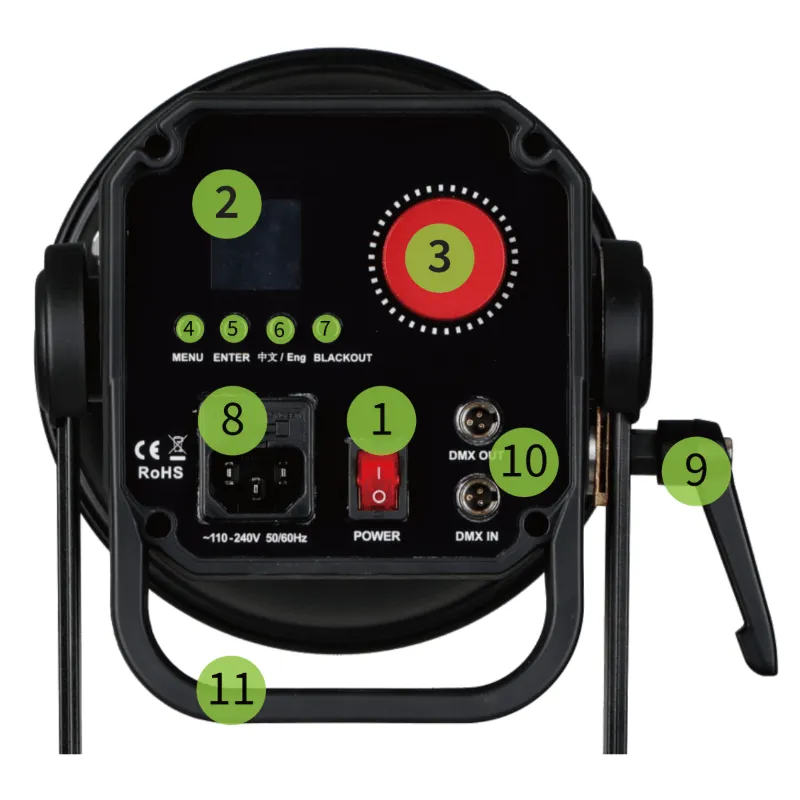
- Διακόπτης ON / OFF
- Εκθέτω
- Κύλινδρος ελέγχου
- Κουμπί MENU
- Κουμπί ENTER
- Κουμπί αλλαγής γλώσσας
- Κουμπί BLACKOUT
- Πρίζα ρεύματος
- Κλείδωμα κλίσης
- Είσοδος και έξοδος DMX
- Λαβή
3. Έλεγχος φωτός FOMEI LED DMX 300B
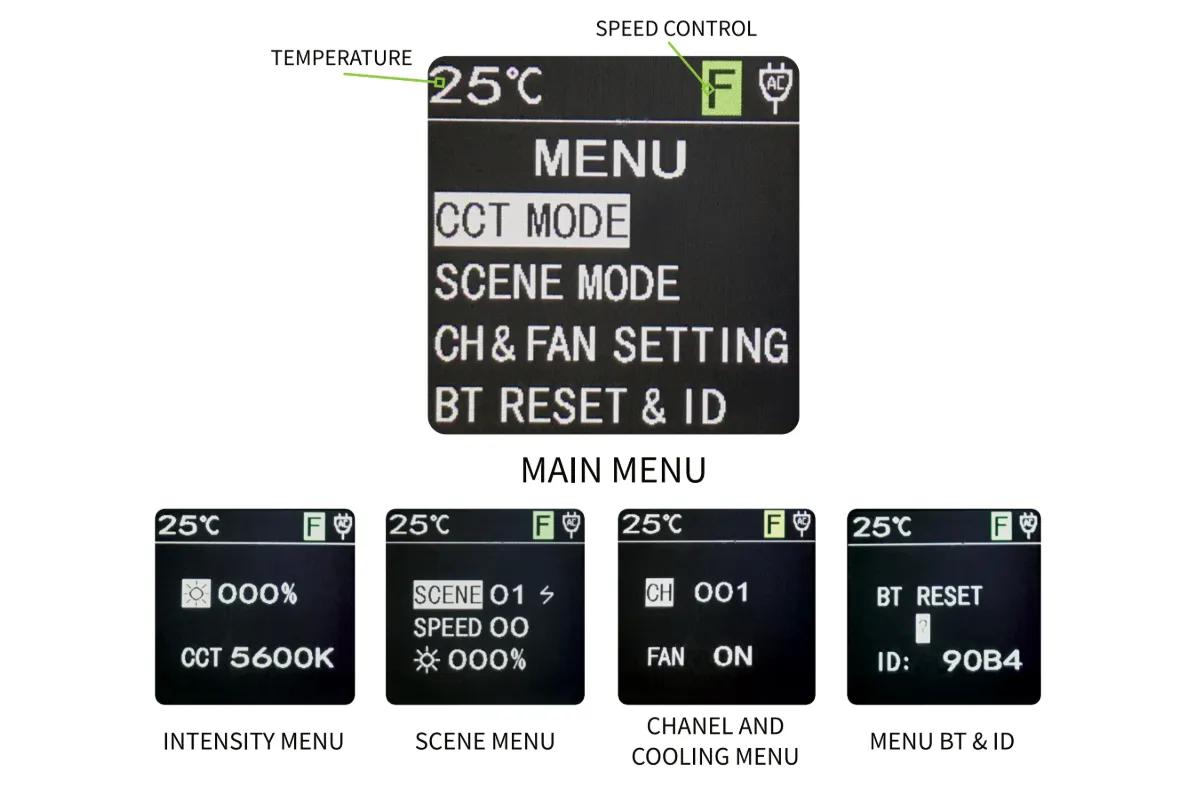
Το FOMEI LED DMX 300B παρέχει έλεγχο φωτός μέσω της οθόνης. Η θερμοκρασία βρίσκεται πάντα στην επάνω αριστερή γωνία της οθόνης, ενώ ο έλεγχος ταχύτητας παραμένει στην επάνω δεξιά γωνία της οθόνης. Από το κύριο μενού, υπάρχουν στοιχεία μενού για: Λειτουργία CCT (Ένταση), Λειτουργία σκηνής, Ρύθμιση καναλιού και ανεμιστήρα (Ψύξη) και Επαναφορά & ID BT (Bluetooth).
Κύριο Μενού
Μετά την ενεργοποίηση του FOMEI LED DMX 300B, το κύριο μενού εμφανίζεται στην οθόνη. Χρησιμοποιήστε τον κόκκινο τροχό κύλισης για να περιηγηθείτε στις επιλογές του κύριου μενού και χρησιμοποιήστε το κουμπί ENTER για να ανοίξετε ένα επιλεγμένο μενού.
Μενού έντασης
Στο πρώτο μενού, μπορείτε να ρυθμίσετε την ένταση του φωτός σε κλίμακα από 0-100%. Για να το κάνετε αυτό, επιλέξτε το εικονίδιο φωτός, πατήστε το κουμπί ENTER και χρησιμοποιήστε τον τροχό κύλισης για να ρυθμίσετε την ένταση του φωτός. Για ταχύτερο και ακριβέστερο έλεγχο, πιέστε τον κύλινδρο προς τα κάτω για να αλλάξετε την ταχύτητα ρύθμισης. Οι πληροφορίες ταχύτητας κυλίνδρου εμφανίζονται στο πράσινο πλαίσιο στην επάνω γραμμή της οθόνης (F: κατά 10 βαθμούς, S: κατά 1 βαθμό). Για να επιστρέψετε στο κύριο μενού, πατήστε το κουμπί MENU.
Λειτουργία σκηνής
Στο μενού για τη λειτουργία σκηνής, υπάρχουν τρεις παράμετροι: τύπος σκηνής, ταχύτητα σκηνής και ένταση φωτός σκηνής. Το φως έχει εννέα σκηνές: Φλας 1, Φλας 2, Τηλεόραση, Κερί, Παπαράτσι, Στροβοσκοπικό, Μεσαία / Μεγάλη Σκάλα, Διπλό Φλας και Αναπνοή. Χρησιμοποιήστε τον τροχό κύλισης για να επισημάνετε μια παράμετρο και πατήστε το πλήκτρο ENTER για να επεξεργαστείτε το πεδίο. Στη συνέχεια, πατώντας ξανά ENTER, θα επιστρέψετε στις παραμέτρους της σκηνής για περαιτέρω επεξεργασία.
Μενού καναλιών & ανεμιστήρα (ψύξης)
Το μενού Channel &; Fan αλλάζει το κανάλι DMX και ελέγχει την ψύξη του φωτός. Αφού απενεργοποιήσετε την ενεργή ψύξη φωτός, συνιστάται να ελέγξετε τη θερμοκρασία φωτός, η οποία είναι ορατή στην επάνω αριστερή γωνία της οθόνης. Σημείωση: Εάν υπάρχει κίνδυνος υπερθέρμανσης, το φως θα σβήσει αυτόματα.
BT (Bluetooth) Επαναφορά & ID
Το μενού BT Reset &; ID επαναφέρει το σήμα Bluetooth και εμφανίζει το αναγνωριστικό του φωτός. Σημειώστε ότι απαιτείται επαναφορά σήματος BT πριν από κάθε νέα σύνδεση στην εφαρμογή για κινητά. Επιλέξτε ΝΑΙ και το φως θα μηδενιστεί αυτόματα.
Έλεγχος μέσω εφαρμογής
Αφού επαναφέρετε το σήμα Bluetooth στο FOMEI LED DMX 300B, συνδεθείτε στη συσκευή στο κινητό μέσω Bluetooth χρησιμοποιώντας την εφαρμογή Desal Lite+ που έχετε κατεβάσει στο τηλέφωνό σας. Στην εφαρμογή, πατήστε το σύμβολο συν ("+") στην επάνω δεξιά γωνία και πατήστε "Προσθήκη συσκευής" για να αναζητήσετε φώτα. Όταν βρεθεί ένα, πατήστε ξανά το σύμβολο συν για να προσθέσετε το φως. Είναι πλέον δυνατή η χρήση της εφαρμογής για έλεγχο της έντασης του φωτός, της φωτεινής σκηνής και για συγχρονισμό του φωτός με τη μουσική.
Λήψη εφαρμογής Desal Lite+
Η εφαρμογή Desal Lite+ για τον έλεγχο του FOMEI LED DMX 300B είναι διαθέσιμη για λήψη σε iOS και Android. Αναζητήστε στο κατάστημα εφαρμογών Apple Store το "DESAL Light +" για λήψη σε iOS ή χρησιμοποιήστε τον παρακάτω κωδικό QR για γρήγορη πρόσβαση σε λήψεις εκδόσεων iOS ή Android της εφαρμογής.

4. Τεχνικές πληροφορίες
Οι τεχνικές προδιαγραφές του φωτιστικού στούντιο FOMEI LED DMX 300B φαίνονται στον παρακάτω πίνακα.
Πληροφορίες και επικοινωνία της εταιρείας FOMEI
Η εταιρεία FOMEI sro είναι εγγεγραμμένη στη διεύθυνση: Machkova 587, Hradec Kralove 500 11, Τσεχία.
Στείλτε e-mail στο sls@fomei.com για γενικές ερωτήσεις ή στο servis@fomei.com για αιτήματα εξυπηρέτησης.
Τηλέφωνο: +420 495 056 505
Τελικές σημειώσεις
Αυτή είναι μια αναπαραγωγή του επίσημου εγχειριδίου χρήσης FOMEI LED DMX 300B, το οποίο είναι επίσης διαθέσιμο σε έκδοση PDF με δυνατότητα λήψης στο fomei.com. Για πληροφορίες σέρβις, ανατρέξτε στην τεκμηρίωση που παρέχεται ειδικά με τη συσκευή σας ή στο τμήμα σέρβις της FOMEI για άμεση υποστήριξη.


Σειρά EOS Rebel


Σειρά EOS DSLR


Σειρά καθρέπτη EOS M


Σειρά PowerShot


Κοντινό πλάνο / χειρός

Η σειρά Canon EOS Rebel Series προσφέρει φωτογραφικές μηχανές DSLR φιλικές για αρχάριους με σταθερή ποιότητα εικόνας, διαισθητικά χειριστήρια και ευέλικτες λειτουργίες. Ιδανικές για τους λάτρεις της φωτογραφίας, αυτές οι κάμερες παρέχουν αξιόπιστη αυτόματη εστίαση, οθόνες αφής μεταβλητής γωνίας και εγγραφή βίντεο Full HD ή 4K.
Σύνδεση
Ανάλυση (MP)
Ψήφισμα
Η σειρά Canon EOS DSLR προσφέρει εικόνες υψηλής ποιότητας, γρήγορη αυτόματη εστίαση και ευελιξία, καθιστώντας την ιδανική τόσο για τη φωτογραφία όσο και για την παραγωγή βίντεο.
Σύνδεση
Ανάλυση (MP)
Ψήφισμα
Η σειρά Canon EOS M Mirrorless Series συνδυάζει τη σχεδίαση μικρών διαστάσεων με απόδοση τύπου DSLR. Με εναλλάξιμους φακούς, γρήγορη αυτόματη εστίαση και αισθητήρες εικόνας υψηλής ποιότητας, αυτές οι κάμερες είναι ιδανικές για ταξιδιώτες και δημιουργούς περιεχομένου που αναζητούν φορητότητα χωρίς να θυσιάζουν την ποιότητα της εικόνας.
Σύνδεση
Ανάλυση (MP)
Ψήφισμα
Η σειρά Canon PowerShot προσφέρει συμπαγείς, φιλικές προς το χρήστη κάμερες για περιστασιακούς σκοπευτές και λάτρεις. Με μοντέλα που κυμαίνονται από απλές λήψεις έως προηγμένες κάμερες ζουμ, παρέχουν ευκολία, σταθερή ποιότητα εικόνας και λειτουργίες όπως σταθεροποίηση εικόνας και βίντεο 4K.
Σύνδεση
Ανάλυση (MP)
Ψήφισμα
Οι φωτογραφικές μηχανές Canon Close-Up &; Handheld έχουν σχεδιαστεί για λεπτομερείς, κοντινές φωτογραφίες και βίντεο. Συμπαγείς και εύχρηστες, προσφέρουν εστίαση ακριβείας, απεικόνιση υψηλής ανάλυσης και ευέλικτες δυνατότητες μακροεντολών, ιδανικές για vlogging, φωτογράφιση προϊόντων και δημιουργικά κοντινά πλάνα.


